Alapacis syncs photos, videos and audio between your PC and your phone, directly over your home WiFi. No cloud. No subscriptions. Your data never leaves your network.
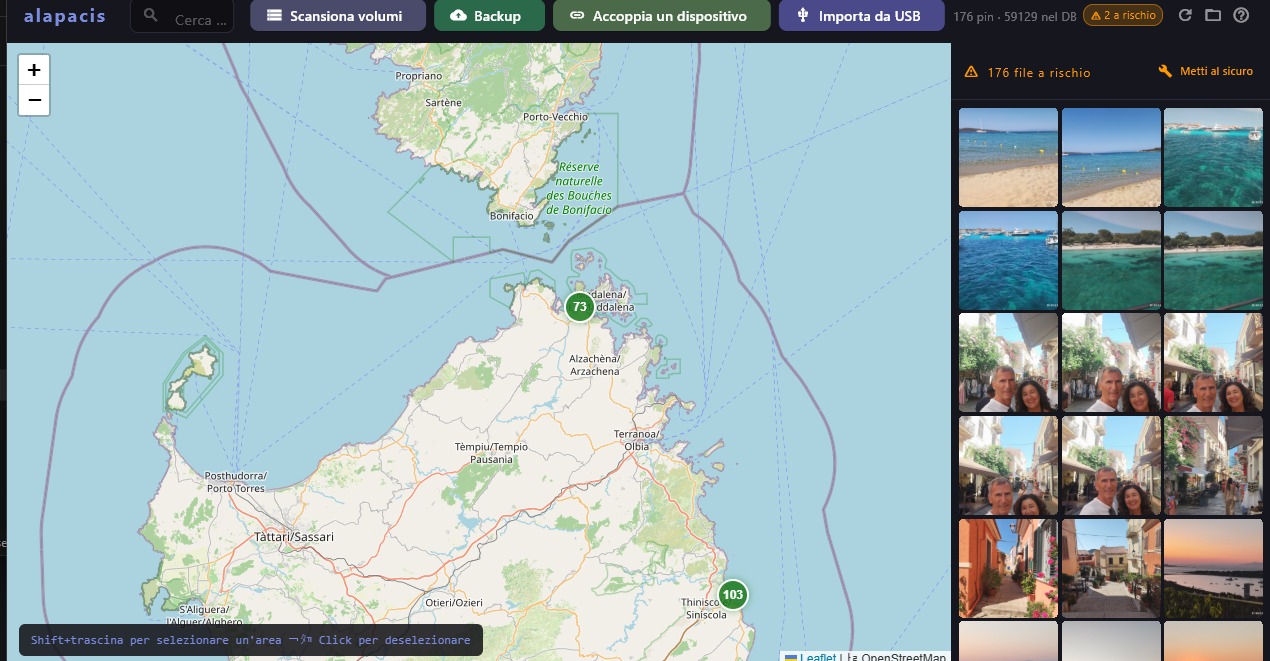
The real app — interactive map with your geotagged photos
Your phone is full of photos and videos. To avoid losing them, are you forced to upgrade every 2–3 years with double the storage?
You want your photos and videos to save automatically to your PC and an external drive the moment you connect it — without touching any app, no USB cables, and without anyone else seeing them? And you want the big cloud providers to stop having access to your photos, videos and documents — processing them under the guise of making them available to you?
You'd like to reduce the silent but enormous energy consumption that every photo triggers as it travels across dozens of devices and replicated data centres?
Your files are scattered across too many devices and you don't always know where something is, or how many copies still exist?
If the answer is yes — you're in the right place for an alternative.
For years I worked developing archiving solutions for public and private organisations. I realised that more and more people — across every culture and latitude — want to regain control of their photos and videos, which have become too numerous and scattered across too many digital devices.
As in adventure novels you need a map to find the treasure: Alapacis automatically generates a map of all your files. PC, Mac, Linux workstation and smartphone sync it with each other over an encrypted connection, without ever leaving your home WiFi, without pressing a button.
Each device — your smartphone, for example — holds the map and thumbnails of all the files on your PC and removable drives, and can download them on demand. You no longer need to keep everything on your smartphone, whose storage is never enough. Files stay in your privacy. Transmission happens only between your devices, encrypted.
No more cumulative transmission over undersea cables and storage in data centres with privacy policies too complex to be aware of.
— Franco Bazzigotti, developer of Alapacis
Google Photos, iCloud, Dropbox, Amazon: every photo you upload is at the disposal of a multinational corporation. Their algorithms distribute it across multiple servers and can analyse it.
With Alapacis, files stay on your PC and your phone. Sync happens only on your home WiFi, encrypted with TLS and protected by a unique pairing code. No third-party servers. No subscriptions. Ever.
Every GPS-tagged photo appears on a map. Zoom into Malta and see all the photos taken there. Search "Sardinia" and find all the files in that folder.
Every file shows how many copies exist: red = phone only, blue = 1 PC copy, green = also on backup drive: safe. Never lose a photo again.
You get home, your phone connects to WiFi and sync starts automatically. No button to press. New photos are already on your PC.
The first connection requires scanning a QR code valid for 60 seconds. Self-signed TLS certificate with pinning. No unknown device can connect.
Plug in a USB drive: Alapacis detects it and, if set as a backup drive, automatically copies files not yet replicated. Otherwise lets you browse files by name, location, date and size, identifying from content whether they're unique or already on other devices.
No PC handy? Plug a USB stick into your phone with an OTG adapter: Alapacis detects it and automatically copies files that exist only on your device, organised by year and month. When you plug the same stick into a PC later, files are recognised without duplicates.
Away on holiday and need a document from your PC? With Tailscale you access your home PC directly and securely, as if you were on your local network.
Available on Amazon or any electronics shop. Works with any FAT32 or exFAT USB stick.
Alapacis is designed around PC and phone — but you can use it without a computer too. All you need is a €30 USB stick and a €3 OTG adapter.
When it comes in handy
You're shooting photos all day and your phone storage is running out. With the stick always in your bag, Alapacis saves new photos automatically as soon as you plug it in. Get home, plug the stick into the PC: files land on the disk without touching a thing.
A 5-minute 4K video weighs 2–3 GB. The stick acts as a buffer: keeps the phone free for new shots without waiting for home WiFi. When you get back and plug the stick into the PC, Alapacis transfers them to the disk automatically.
One-time payment. 15-day free trial — no card required.
Online purchase coming soon.
* After the first year, app updates (including map support) are available for renewal at ~€12/year.
Without renewal the app continues to work on the already-installed version.
** Requires a free personal account on Tailscale.
Big cloud companies tell you your files are "safe" on their servers.
But safe from whom? Not from them.
With Alapacis your data stays at home. On your hardware. Under your control.
Requires Windows 10/11 (64-bit) · Run the setup and follow the instructions
↓ Download for Windows (setup) v1.0.3 · 71 MB⚠️ Your browser may show "Suspicious download blocked" — choose Download anyway.
If Windows shows "Microsoft Defender prevented this app from starting", click More info → Run anyway.
Requires Android 9.0 or higher · Enable "Unknown sources" in settings
↓ Download APK v1.0.3 · 71 MBIn development — check back soon
The complete flow from first installation to first sync.
Download the app from the section below. The first time, Windows may show a protection warning: click More info → Run anyway.
If your phone has many photos and videos not yet on your PC, copy them first with a USB cable — it's much faster than Wi-Fi for large amounts of files.
Download the APK from the section below (pending publication on Google Play) and install it. If prompted, enable installation from unknown sources.
Launch the app on both PC and Android. Both apps run a full scan on first launch — this may take a few minutes depending on how many files you have.
On your PC go to Tools → Pair a device. On your phone tap the sync icon, scan the QR code, and the first sync starts automatically.
The installer already includes everything needed to generate previews, videos included. Just one optional step, plus one for access from outside your home.
Recommended if you use a recent-generation smartphone set up to handle high-compression HEIC/HEIF images (e.g. iPhone and many recent Android phones). Not required by Alapacis, which generates previews without it too, but with this codec Windows also displays them natively in File Explorer and the Photos app.
To access your files from outside your home:
100.x.x.x address Tailscale assigns to your PCWant to access your files from outside your home? Tailscale creates an encrypted private network between your devices — free for personal use. No port-forwarding. No corporate VPN.
Go to tailscale.com and sign up with Google or Microsoft. The free plan supports up to 100 devices.
Download and install Tailscale for Windows. On first launch, sign in. Your PC gets a fixed IP like 100.x.x.x.
Download Tailscale for Android from the Play Store. Sign in with the same account. Devices find each other automatically.
In Alapacis on your phone, go to Settings → PC and enter your PC's Tailscale address (e.g. 100.x.x.x). From that moment you can access your files from anywhere in the world.